Keep the Database. Retire the Application.
Your Historical Data Stays Accessible.
Keep historical SQL Server database records browseable, searchable, and accessible after the legacy application is retired — without direct SQL queries or maintaining the old environment.
- Browse by table
- Search + filter
- No legacy application required
Why Choose Cortex Archive for Generic Database?
Preserve access to historical SQL Server data without maintaining the legacy application solely for occasional lookups or requiring end users to write SQL queries.
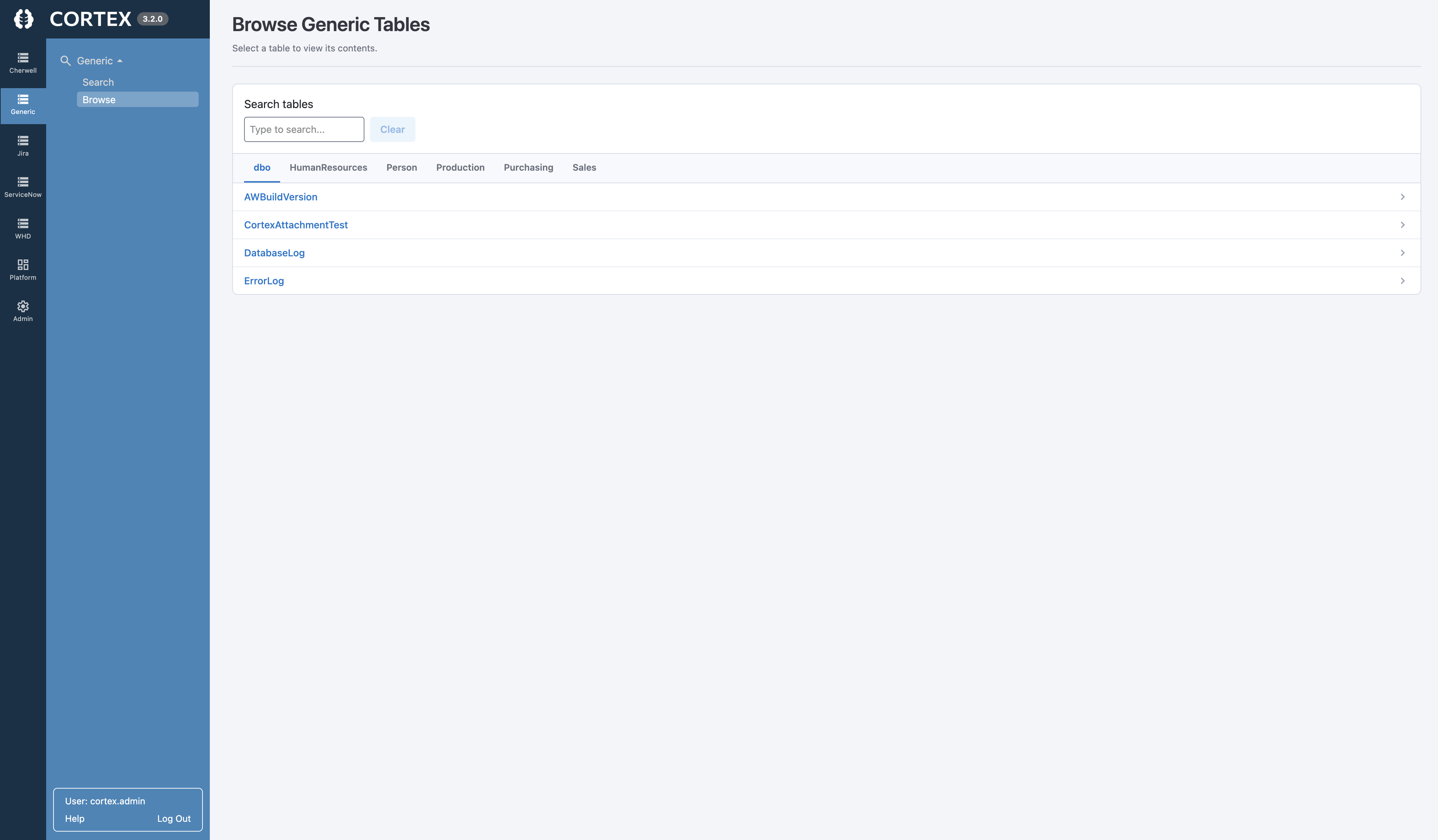
Browse Data by Table
Discover available tables and schema, then open historical data by table without needing direct database access or SQL knowledge.
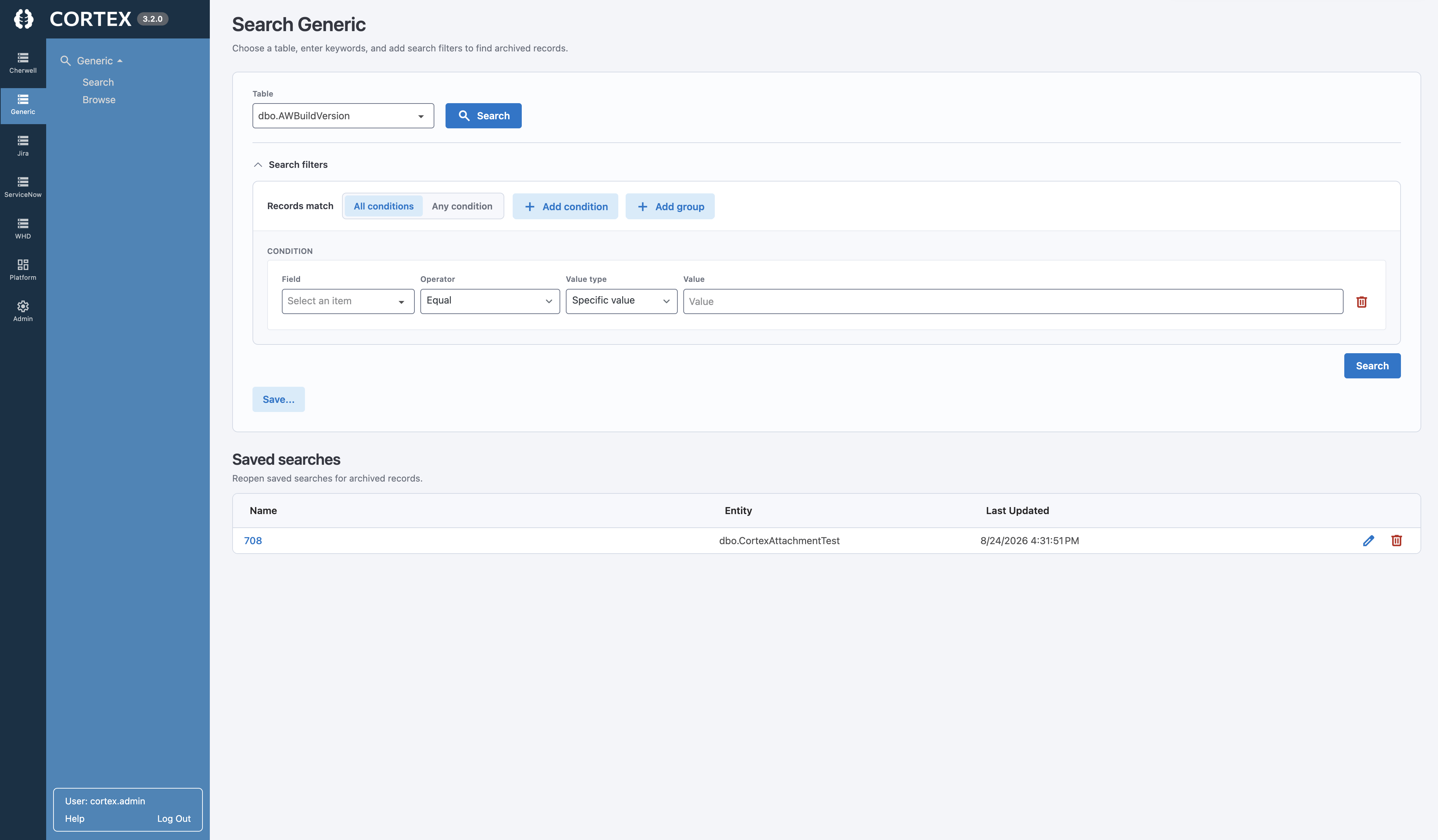
Search Historical Records
Search archived records using Cortex's common archive experience to find the specific data users actually need.
Structured Filters
Apply filters by field and criteria to narrow results, with paging and counts that make larger result sets manageable.
Saved Searches
Save frequently used searches so teams can quickly return to the records they reference most without redefining criteria.
Related Data Navigation
Follow relationships between tables where supported by the database schema to find connected records.
Consistent Cortex Interface
Give users a familiar, read-only archive experience over retained historical data instead of SQL tools or static exports.
Search and Navigate Historical Database Records With Ease
Your team shouldn't need SQL knowledge—or a scavenger hunt through database exports—to find an old record.
- Browse available database tables and schema
- Search archived records across tables
- Filter by fields
and criteria - Use paging and counts for larger result sets
- Save frequently used searches
- Navigate related data where schema supports it
Keep the Data—Without Keeping the Old Application Running
Maintaining a legacy application solely for occasional historical lookups adds cost, risk, and administration. Cortex provides a separate, read-only experience over your retained database.
Keeping the Legacy Application
- Requires ongoing application infrastructure and administration
- Keeps history dependent on an outdated environment
- Relies on the old UI for occasional historical access
- Uses resources that could focus on the replacement platform
Cortex Archive
- Built for ongoing historical access without the old application
- Connects to your retained SQL Server database
- Provides a familiar browse and search experience
- Keeps historical data accessible for the long term
Generic Database Archiving FAQs
Can we access database records after retiring the legacy application?
Yes. Cortex Archive provides a separate, read-only interface for browsing and searching retained SQL Server database records after the original application is retired.
What database information can Cortex Archive preserve?
Cortex connects to a retained SQL Server database and discovers available tables and schema, allowing users to browse archived data by table, search records, apply structured filters, and navigate related data where supported.
Do we need to keep the old application running to access archived data?
No. Cortex Archive is designed to provide historical access without requiring the original legacy application to remain available solely for record lookup.
Can users search archived database records?
Yes. Users can search, filter, and browse historical records through Cortex Archive rather than relying on direct SQL queries, database dumps, or spreadsheet exports.
Can Cortex navigate relationships between tables?
Cortex Archive is designed to navigate related data where supported by the database schema, helping users find connected records without reconstructing context manually.
Is archived database data editable?
No. Cortex Archive provides read-only historical access to help preserve the integrity of retained records.
Ready to Retire the Application—But Not Your Data?
Keep your historical SQL Server database records searchable, accessible, and useful after the legacy application is retired.